How AI Agents Are Deployed for Industrial Operations
Industrial AI agents deploy in four layers: a data connection, a reasoning layer, an action channel, and connectors to outside tools. See how each one works.



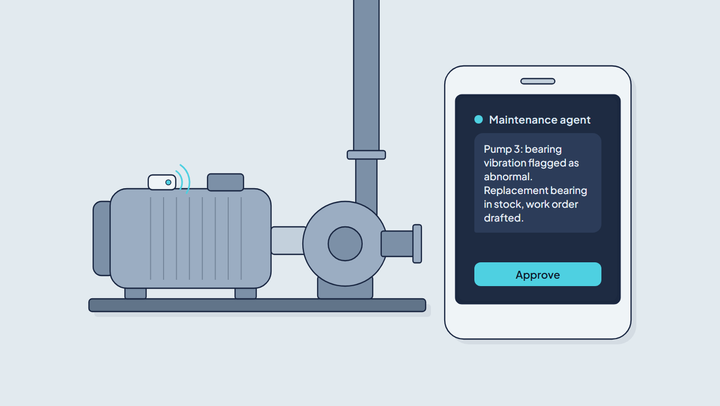
Deploying an industrial AI agent means wiring together four layers: a connection into operational data, a reasoning layer that turns that data into a judgment, an action channel the agent uses to reach a person or a system, and connectors to the tools it doesn't own. None of them is optional, and none of them is a single toggle — "adding AI agents" to a plant is closer to standing up a small integration project than installing an app.
What Does "Deploying" an Industrial AI Agent Actually Mean?
Deploying an industrial AI agent means connecting it to live operational data, giving it a reasoning process to interpret that data, and routing its output through a channel that reaches a person or a downstream system — not switching on a chat window. The phrase gets used loosely because a text-based interface is the easiest part to demo and the hardest part to mistake for the whole system.
A chatbot answers questions about whatever you paste into it. An industrial AI agent has to earn its answers: it needs a live read from a PLC, a SCADA historian, or an IoT platform before it can say anything true about a pressure trend or a motor's vibration signature. Skip that connection and the "agent" is reasoning over nothing — confident language wrapped around no data.
An industrial AI agent can act on live machine data only when two layers are in place: a data connection that reads current tag values rather than a pasted export, and an action channel with permission to do something — send an alert, open a work order, acknowledge an alarm. An agent with the first layer but not the second is an analyst. An agent with neither is a chatbot. Tractian, Siemens and Augmentir, covered in the deployment section, all ship both.
Step 1: Connecting to Operational Data
Connecting an industrial AI agent to operational data means giving it a live, reliable read on the equipment it reasons about: streaming telemetry from sensors, gateways and PLCs, plus access to the SCADA historian where years of tag data already sit. The data connection is the least glamorous layer and the one nothing else can replace. Without it, the reasoning layer, the action channel and every outside tool are working from fiction.
Most industrial deployments connect through one of three paths. MQTT is the default for anything already streaming — sensors, gateways, and edge devices publish to a broker, and the platform subscribes. HTTP/REST fits lower-frequency or request-driven data, like a batch report or an ERP lookup. For equipment that predates either — a PLC on the plant floor, a SCADA historian holding years of tag data — the connection runs through OPC UA or a protocol gateway that translates Modbus or Profinet into something the platform can ingest.
A growing number of plants solve this once, upstream, with a Unified Namespace: a single MQTT-based data spine that every consumer — dashboards, agents, historians — subscribes to instead of each building its own point-to-point integration. An agent built against a Unified Namespace doesn't need custom wiring per data source; it reads from the same spine everything else already does.
Step 2: Giving the Agent Something to Reason Over
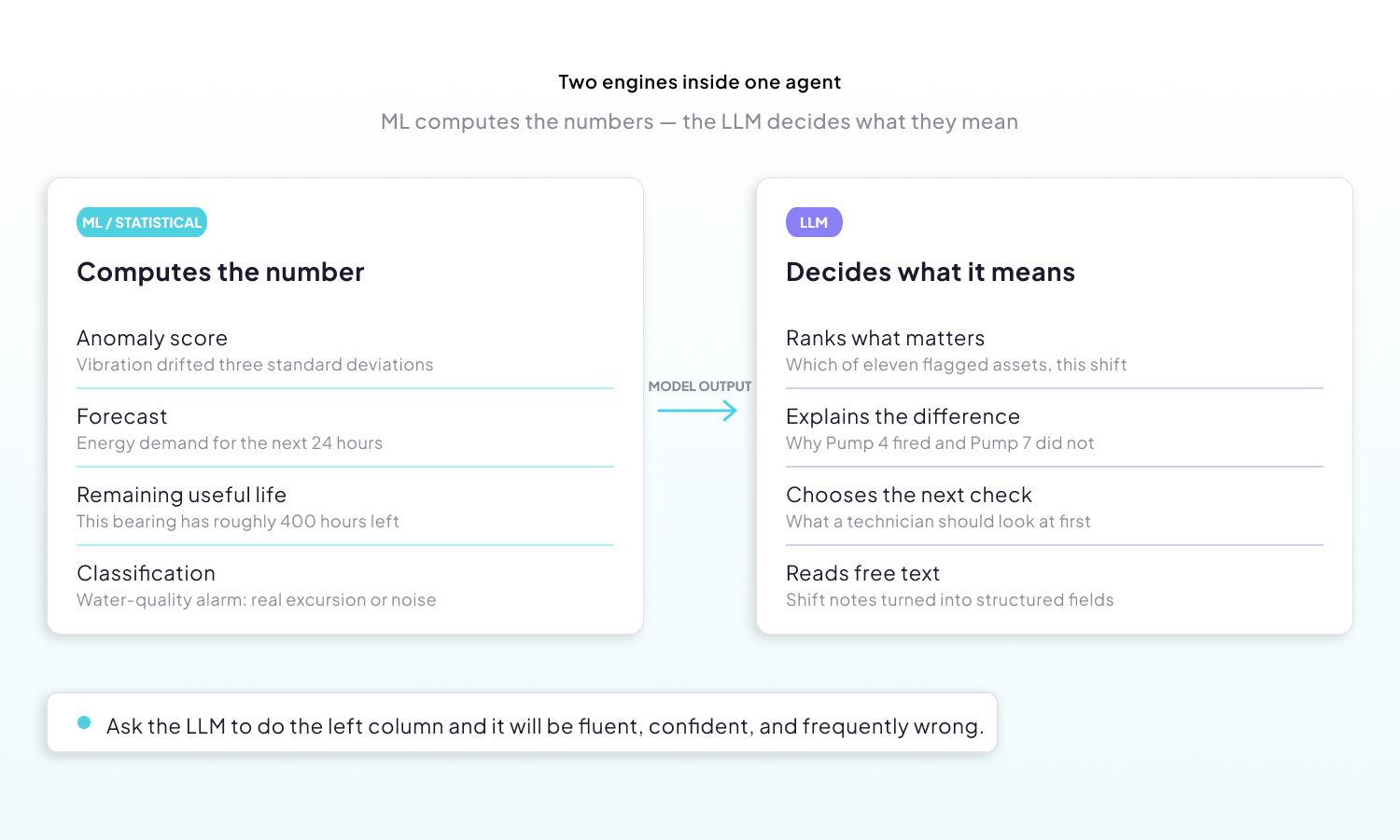
A live data connection produces numbers, not judgments. The reasoning layer is where machine-learning models turn those numbers into something an industrial AI agent can weigh: an anomaly score, a remaining-useful-life estimate, a forecast, a threshold breach with its history attached. The language model then reasons over those outputs, never over the raw stream.
This division of labor is what separates industrial AI agents that hold up from the ones that fall apart in a pilot. Statistical and machine-learning models do the numeric work — anomaly detection that flags a vibration signature drifting three standard deviations from its baseline, or a predictive maintenance model estimating that a bearing has roughly 400 hours left. The language model computes none of that. It reasons over the output: which of eleven flagged assets matters most this shift, whether the drift coincides with a known recipe change, what a technician should check first.
Ask an LLM to find the anomaly in a raw tag history and it will produce a fluent, confident, and frequently wrong answer. Ask it to explain why an anomaly detector fired on Pump 4 while the same pattern on Pump 7 was benign — given both assets' maintenance records — and it does the thing it is actually good at. The rule worth carrying into a deployment: ML for inference, LLM for reasoning.
Practically, that means pre-computing before you prompt. Feed the agent aggregated windows and model outputs — hourly means, a z-score, a classification label — not 40,000 raw points that will exhaust a context window and cost more per query than the answer is worth. Attach the context a human would need: asset type, location, nameplate specs, recent work orders, and what "normal" looks like for that line.
And keep deterministic logic deterministic. If pressure above 100 psi should always page someone, that is a threshold rule, not a reasoning task — conditional events and alerts handle it more reliably and at a fraction of the cost. Route the agent at the ambiguous cases: the ones where a person would have to weigh several signals against each other before deciding whether to act.
Step 3: Choosing How It Acts
An industrial AI agent's conclusion is worth nothing if it arrives somewhere nobody is looking. The action channel is how that output reaches a person who can act on it — a technician's phone, an engineering team's chat thread, a manager's inbox — or a system that can act without one, such as a work-order queue.
This is a deployment decision, not an interface preference. Maintenance technicians do not sit in front of dashboards — they are on the floor with a phone in one pocket. A reliability engineer investigating a recurring fault wants the conversation next to the trend chart. A plant manager wants one shift summary at 6 a.m., not eleven notifications overnight.
The table below maps the channels most industrial deployments choose between, and who each one actually reaches.
| Channel | Who it reaches | Best suited to |
|---|---|---|
| WhatsApp / SMS | Technicians, on-call staff, contractors | Urgent single-asset alerts needing a response in minutes |
| Slack / Teams | Engineering and operations teams | Collaborative triage, where the thread becomes the record |
| Managers, external stakeholders | Scheduled digests — shift handovers, weekly summaries | |
| In-dashboard chat | Analysts, integrators | Investigation, with the data already on screen |
| Work-order system | Maintenance planners | Anything that must become tracked, assigned work |
The messaging channels carry more weight than they appear to. A WhatsApp AI agent reaches the contractor who has never logged into the platform and never will — no app to install, no license to provision, no training session. That single detail often decides whether a deployment survives the end of its pilot. Threshold-driven WhatsApp notifications follow the same reasoning, without the agent in the loop.
A WhatsApp alert when a machine goes out of range does not need an agent at all. A threshold event watches one variable — motor temperature above 80 °C for five minutes, say — and sends a fixed message to a phone number when the condition holds. Bring in the agent when the alert needs judgment: which of several out-of-range machines to check first, or whether the reading is a sensor fault rather than a real excursion.
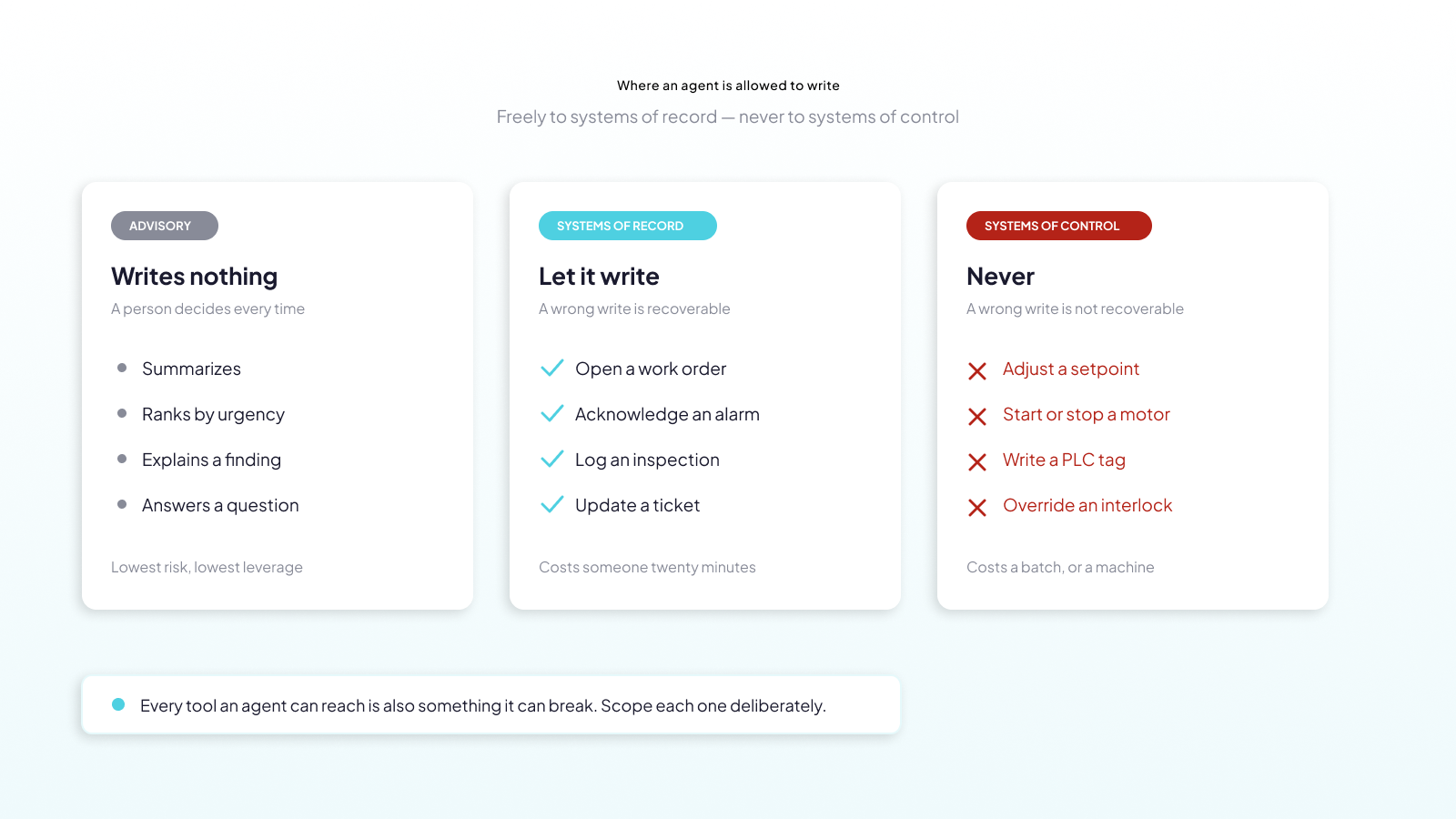
Then comes the harder question: does the agent notify, or does it act? Advisory agents write nothing — they summarize, rank, and explain, and a person decides. Agents with write access, the autonomous end of the range, can open a work order, acknowledge an alarm, or adjust a setpoint, which is where deployments earn real time back and also where they carry real risk.
The working rule in most plants: let the agent write freely to systems of record, and never to systems of control. A wrongly created work order costs someone twenty minutes. A wrongly written setpoint costs a batch, a machine, or a shift of unplanned downtime.
The table below sets out where each kind of agent may write.
| Agent type | What it writes to | Examples |
|---|---|---|
| Advisory | Nothing — it summarizes, ranks and explains, and a person decides | Shift summary, ranked list of flagged assets |
| System of record | Records a person can review and reverse | Open a work order, acknowledge an alarm, add a maintenance note |
| System of control | Nothing, ever | No setpoint changes, motor starts, PLC tag writes or interlock overrides |
Step 4: Reaching Tools Beyond the Platform
Reaching tools beyond the platform means connecting an industrial AI agent to the systems that hold what telemetry cannot: a CMMS with the service history, an ERP with parts stock and warranty terms, a spreadsheet a planner maintains, a supplier's portal. Telemetry can tell an agent that a compressor is drawing more current than it did last month. Only those outside systems can say whether it is still under warranty, when it was last serviced, or whether the replacement bearing is on a shelf in the building.
There are two ways to make that connection. The older way is a bespoke integration per system: a REST call, a webhook, a scheduled sync, each written and maintained by hand. The newer way is the Model Context Protocol.
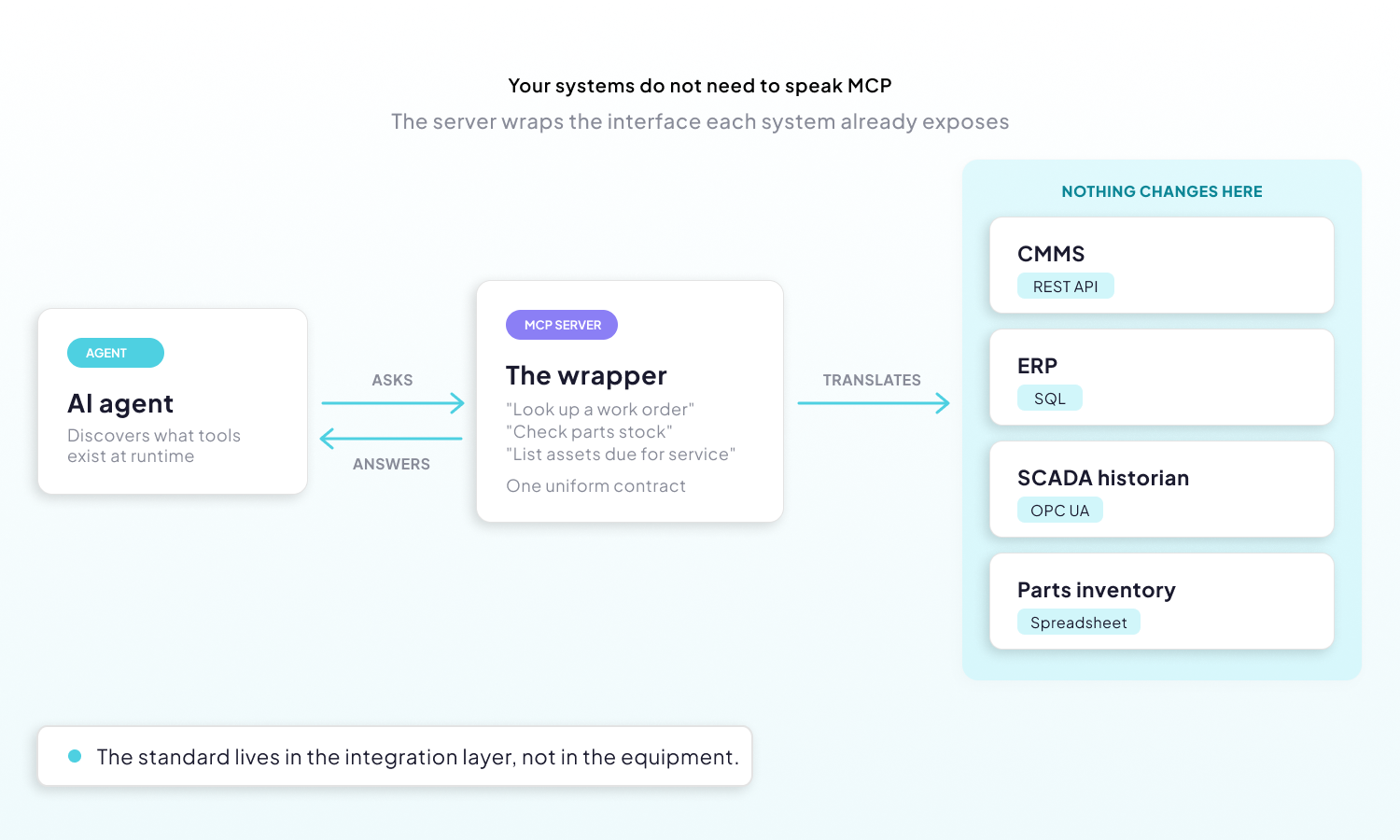
MCP is an open standard for exposing tools and data to an AI application through one uniform contract. An MCP server describes what it can do — "look up a work order," "check parts stock," "list assets due for service" — and the agent discovers those capabilities at runtime rather than having them hardcoded into a fixed call chain. Add a server, and the agent gains a skill without anyone rewriting the agent.
One point worth stating plainly, because it stops a lot of projects unnecessarily: your industrial systems do not need to support MCP themselves. You do not need your SCADA vendor to ship it. An MCP server sits in front of whatever interface already exists — a REST API, a SQL connection, an OPC UA endpoint — and translates. The standard lives in the integration layer, not in the equipment. Ubidots' own MCP server works this way — it exposes existing platform data to external AI tools without anything changing on the device side.
Vendor neutrality follows from the same design. MCP is an open standard, and each MCP server wraps an interface that already exists, so one industrial AI agent can query a Siemens PLC over OPC UA, a historian over SQL and a third-party CMMS over REST in the same session. Replacing any of those systems means swapping one server, not rebuilding the agent.
Scope each connection deliberately. Every tool an agent can reach widens what it can do when it reasons correctly, and what it can break when it does not. Read-only credentials for anything the agent only needs to consult, write access only where a wrong write is recoverable, and an audit trail of every tool call in both cases.
Who's Actually Deploying These Today
Industrial AI agents built on these four layers — data connection, reasoning, action channel and outside tools — are already running in named plants, and vendors from Siemens to Tractian ship the architecture as a product. The public record is specific enough to check, and every example below is backed by the company's own announcement or documentation, listed under Sources.
Named plant deployments. Buzzi Unicem USA, the U.S. cement producer, announced a partnership with UptimeAI beginning with a pilot of AI Expert — the vendor describes the platform as trained on more than 1,000 failure modes — at its Festus, Missouri plant. Petroleum Development Oman announced a deployment of UptimeAI's operational-excellence product across its equipment fleet, with regional partner Karad Systems supporting the rollout. These are the clearest public examples of the full pattern running in a real facility rather than a demo.
Three of the four layers in one stack. Tractian is the tidiest illustration of the architecture described above. Its Smart Trac sensors capture vibration, ultrasound, temperature and RPM from rotating equipment and stream it over 4G/LTE. A conversational copilot turns the resulting diagnosis into plain-language guidance, so a technician does not need a vibration analyst on call. The finding then flows into a CMMS work order carrying the diagnosis and suggested repair steps — data connection, reasoning layer, action channel, in one product.
Agents grounded in a data model. Cognite's Atlas AI is a low-code workbench for building industrial agents, with agents drawing context from Cognite Data Fusion's industrial knowledge graph rather than from raw tags. It is the same argument Step 2 makes: reasoning quality depends on what the agent is given to reason over.
Orchestration at platform scale. Siemens introduced AI agents for industrial automation at Automate 2025, built around an orchestrator that dispatches specialized agents and lets them call external tools and other agents — Step 4, implemented as product architecture. Augmentir takes the frontline-worker path: its AI Agent Studio lets manufacturers build agents with no-code tools, and those agents can act on their own, including triggering email and SMS, alongside integrations with ERP, CMMS, QMS and MES systems.
What This Means for Your First Industrial AI Agent
Whatever platform you build on, the same four questions decide whether an industrial AI agent deployment holds up: where the live data comes from, what turns it into a judgment, how that judgment reaches someone who can act, and what the agent can reach beyond the platform. Platforms differ mainly in how much of that arrives already assembled.
When an industrial AI agent pilot stalls before production, the cause usually sits in one of those four layers. The agent reads a one-off export instead of a live connection; the language model is asked to do numeric work a model should do; the output lands in a dashboard nobody on shift opens; or the answer depends on a system the agent cannot reach. All four can be checked before the pilot starts, which is far easier than diagnosing them after it stalls.
Ubidots implements the pattern end to end. Devices connect over MQTT, HTTP/REST, or through an OPC UA/protocol gateway for older equipment; agents configured in the AI Center reason over that data and can query it directly; a conclusion reaches a technician over WhatsApp or in-platform chat, the same channel a threshold alert already uses; and when the next step lives outside Ubidots, its own MCP server exposes that data to external AI tools without anything changing on the device side. Data connection, reasoning, delivery, and outside reach — four layers, one platform.
Frequently Asked Questions About Deploying Industrial AI Agents
How are AI agents deployed in industrial operations?
An industrial AI agent is deployed in four layers: a connection to live operational data, a reasoning layer that turns that data into a judgment, an action channel that delivers the result to a person or system, and connectors to tools outside the platform. Each layer is a separate engineering decision, and skipping any one of them breaks the deployment.
What data do industrial AI agents need to work?
An industrial AI agent needs live telemetry from the equipment it reasons about, over MQTT, HTTP or OPC UA, plus the context to interpret it: what the asset is, where it sits, its maintenance history and how it behaves normally. Summarized values work better than raw history — a rollup plus a model's verdict beats a month of samples.
Can an AI agent read data from my SCADA system?
Yes, provided the historian's tags reach a platform the agent is able to query — usually by way of OPC UA or a protocol gateway. Once your SCADA data is flowing into Ubidots over MQTT, HTTP, or Modbus, an AI agent configured in the AI Center can query that data directly.
Do I need MCP support in my system for AI agents to use it?
No. MCP belongs to the integration layer, not the equipment: an MCP server wraps whatever API or database your system already exposes, so your PLCs, sensors and SCADA software never have to speak MCP at all. Ubidots ships its own MCP server, so external AI tools can already query your Ubidots data.
Can I get IoT alerts as a WhatsApp AI agent?
Yes. Messaging is a common choice because it meets field staff where they already are, instead of asking them to open a dashboard. Agents built in the AI Center can be deployed as a WhatsApp channel, so your team can ask questions or receive proactive alerts about their equipment directly in WhatsApp.
Sources
- Petroleum Development Oman deployment — UptimeAI announcement
- Tractian sensors, copilot and work-order flow — Industrial Copilot: How AI Reads Your Machines
- Cognite Atlas AI industrial agents — Automation.com coverage
- Siemens AI agents for industrial automation — Siemens press release
- Augmentir Industrial AI Agent Studio — Augmentir newsroom